Saturday, 2 October 2010

Disco Tiles

Disco Tiles Photoshop Tutorial

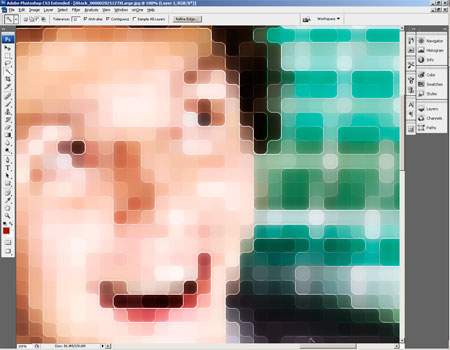
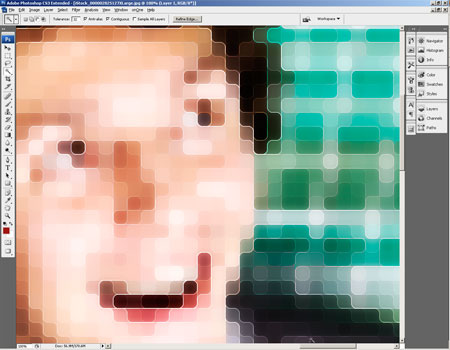
Tired of old boring prints? Try out this fun photo effect on your photos that you can print out to impress your friends. From a distance, it will look like a normal photo but view the printed image up close and you'll see an abstract mosaic pattern that resembles a disco floor. This Photoshop effect is also great for enlarging low resolution photos into poster-size prints.


Preview of Final Results


Disco Tiles Photoshop Tutorial


Step 1

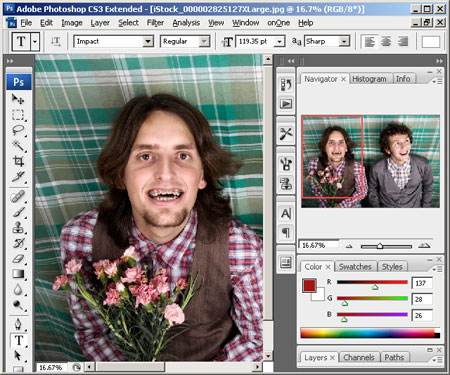
Run Photoshop and open the photo you would like to add this effect to into Photoshop.

Step 2

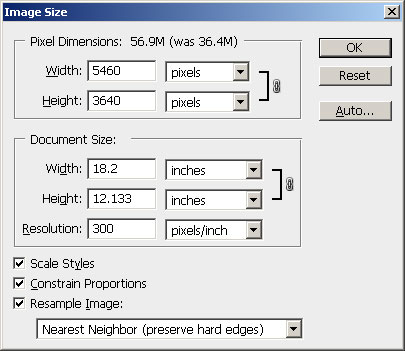
Next, we need to resize the image to the final output size that we would like to print at. Enter the width and height for the document size and specify the resolution. You can set the resampling method to Nearest Neighbor to speed up this process.

Step 3

Before we continue, zoom out so that you can see the whole image. Now open the Filter> Pixelate menu and select Mosaic. In the Mosaic filter tool, adjust the cell size to the largest possible that will retain important details. If you are working on a portrait, you can simply look at the eyes as you adjust the cell size.


Step 4

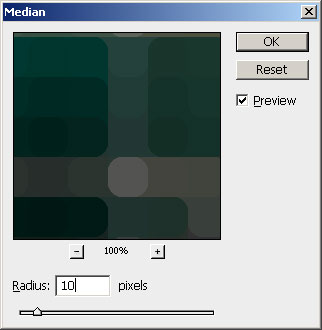
The image is pixelated, but it doesn't look very special. So before we continue, we'll curve the edges for a more contemporary effect. To do this, open the Filter> Noise menu and select Median. Adjust the radius of the filter until you get the rounded corners that you like.
Step 5

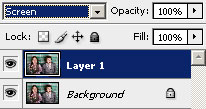
We're done creating the tile pattern, so we'll work on creating the outline now. Duplicate the layer by pressing Ctrl+J or opening the Layer menu and selecting Duplicate. Next, change the blending mode of the new layer to Screen.

Step 6

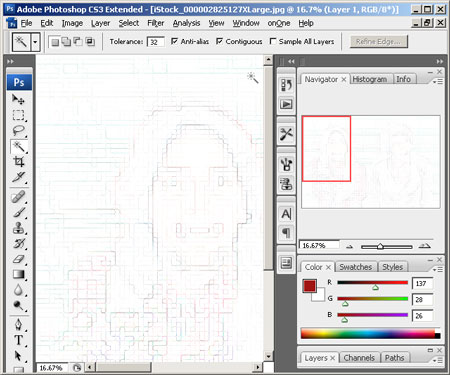
Apply a find edges filter by opening the Filter> Stylize menu and selecting Find Edges. This filter draws an outline of the edges.

Step 7

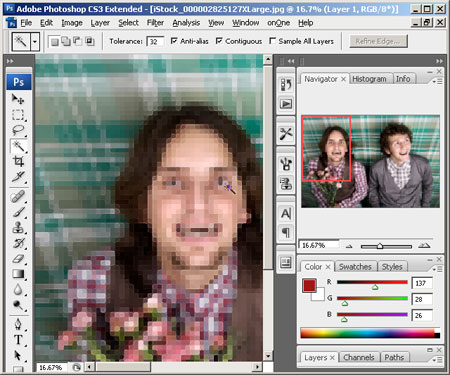
Press Ctrl+I or open the Image> Adjustments menu and select Invert. The outline should be blended into the photo.

Step 8

The tiles and outline effect is now complete. But the effect looks flat and boring. In the next steps, we'll enhance it using a new layer that will add depth and a glow effect to the tiles. First, press Shift+Ctrl+E or open the Layer menu and select Merge Visible. This will create a duplicate of the image as a single layer. Change the blending mode to Overlay. By adding a duplicate of the image with an Overlay blending mode, we can increase the contrast which will enhance the appearance of depth in the tiles.
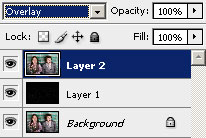
Step 9

Now we'll add a dramatic glow to the tiles. Before we begin, zoom in to 100% so that you can see the individual tiles. Open the Filter> Blur menu and select Gaussian Blur. In the Gaussian Blur filter tool, adjust the radius so that the tiles create a soft glow effect.
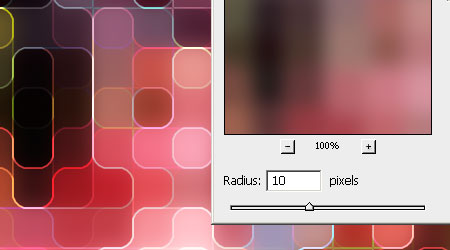

Step 10

We're done! But here's one more step in case you feel that the outline is too thin and you would like to thicken it. Open the Filter> Other menu and select Maximum. Adjust the radius slightly to increase the size of the outline. Click OK when done.
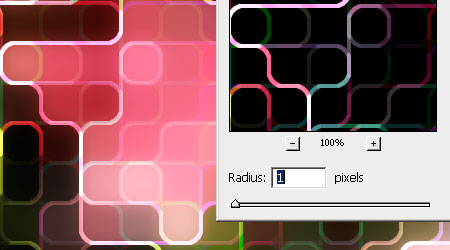

Final Results


Original Photo


Disco Tiles Photoshop Tutorial

unbelivable

nuffang赚点钱了
看到小小的成绩=.=
感谢大家的click
image

回顾Teesplus的日子

现在想起来真的有点怀念啊~~~

DSC00127 
我、MSS NG、HUI YEE、Paulin


DSC00128
这是我们公司的Designer,老师说我很怕怕他的脾气


DSC00131
Tommy是我们公司的Top Salesman,不过呢,他脾气很不好的说,我也怕怕

DSC00132

DSC00133 DSC00134 DSC00135 DSC00136 DSC00137 DSC00138 DSC00139 DSC00141 DSC00142 DSC00143 DSC00144 DSC00145 DSC00147 DSC00148 DSC00149 DSC00150 DSC00153 DSC00154

闷热

早上来到了伟胜家
主要目的是要搜索一些婚纱的拍摄资料
因为昨日,耀充问我是否能够帮他朋友拍婚纱
老实说我并没有很大的自信
毕竟是我不认识的陌生人
如果是朋友的话,我还可以勇往直前

妈妈一直拿对面邻居的孩子来比较
如今他们有本事买车子,而我并没有
唉~想起在teesplus的日子,如果持续下去,说不定,现在已经有一辆车子了
可惜啊,是我的意志太弱了,被朋友松茸我不要继续做了
现在后悔了……

前几天acer3620的寿命已经结束了
所以在家总是没有事情做
想着的是找工作的事情
除此之外,还有编团康带动、营歌等等
一个人构思到快发疯了
音乐只是用电话来播放,实在耐人寻味的感觉
休息的时候,就玩上的soduku
幸好我的脑袋还没有荒废,而且玩起soduku越来越容易
还有空闲的时候就看看书
明锭老师曾经送我的“演讲口才”(我还没有包起来呢)
有两本,看了一部分,受益不浅
果然和现代推销员的心态不一样,尤其是“信”字
就看看“孙子兵法”内容还没有完全看完,一天看一点
想着想着,如果freelance行不通的话
打算回去Perlis发展,这样不是很好么?
回到故乡去XD,我似乎很多事情都半途而废
自己准备的简介打算寄出去的,就只是缺寄出去而已
失败
到最后还不是为了自己的生活营牺牲了
这样的牺牲并不知道是否有意义……
加上对父母的牵挂,实在太重了
我尝试很想切断这份牵挂……(也许就是所谓的放弃父母)

grh….. 好闷热
伟胜的房间不通风
实在grh…..
肚子一把火似地……

Thursday, 30 September 2010

创

创有这样容易么?你认为呢?
哈哈~当没有构思的时候就知道你在跟时间赛跑似地

刚刚把部落格的排版整理下
全新的一个排版
弄到老半天
还是不晓得如何分享……

Monday, 27 September 2010

越权

此时此刻
不晓得要干嘛
当心情低落和顾虑犹豫的时候
要怎么去构思一首团康带动的营歌
提到营歌想必是一个重要的部分
自我要求也特别的高
越权了
我擅自去行动
为什么?总是觉得这样子比较快速
在这方面,我跌倒了
还是要爬起来
带动曲难免有人喜欢有人不喜欢
我怎么能完全去顾虑到那么多人呢?
更何况自己支会的人的喜好
失落的心情,失落的天气
下雨的天气把悲伤带走吧!

想起了前几天发生争吵的事情
当时,晚上我从伟胜家回家
一翔邀请伟胜去hang朋友的派对(但是我没有被邀请到)
但,伟胜却是没有被hang朋友邀请的,但一翔邀请伟胜去
起初的时候,他们都想不要去,因为都不认识
当时由于一翔没有邀请我去,也许他请伟胜去就等于我们两人
所以,我不想太多
但是难免现实总是残酷的
我却等着他们来载,结果事实上并没有被邀请的
我sms了伟胜才知道,他才赶过来载我
可是他拨打电话来,我却上了厕所
事情的发生就是这样
去不成,他们本意都不是去找营员,觉得很过分,是本意还是不是本意都不跟我说!

     “人家都没有邀请你,你生气什么?”

如果这样的事情发生在你身上,你会怎样
原本3位不被邀请的,被其中一位求着去,而另你坚持不去,因为大家都说不去因为不被邀请
就这样等着,才知道其他2人有过去,你就算他们不抛弃你,而你会感觉被抛弃了你,而他们发现了,就去找你
我看就算要去也没有心情了
郁闷,就是这样子,跟伟胜吵架了……
吵得很凶,几乎要绝交,以后就成为熟悉的陌生人
而我想的都是那个人弄到我们彼此这样,我很不喜欢!

过几天的打抱不平就这样发生
终究把事情的经过说出来
把自己的感觉说出来,尝试把之间的误会和瓜葛解除

最近聪业有sms给我
想必要找我聊天什么的
我也吃如此,不过最近都忙着freelance的工作愁闹着呢
因为家里没有得到上网就有点赤手
要去网咖上网又闲麻烦,因为不是自己的电脑
要去WIFI区上网又怕闷,就算聪业去,我也担心我分不了心
实在对聪业很抱歉

突然很想唱歌
大大声的唱K
自己最喜欢唱的有几首歌
其中最爱唱的是“单身情歌”
每次要点这首歌,担心人家说我每次都唱这首
没办法了,一个人自唱好了

屋外下起了雨
则雨是刚才下午下的
起初是一场倾盆大雨
今晚的天气开始冷了咯
身体有点粘粘
先编一编营歌的带动曲才去洗澡吧
今天吃了好多饭加上3~4个煎鸡蛋
感觉没有什么
只是有点累
背酸的地方突然发痒

越权就越权
那又怎样
我这样对自己说……

Sunday, 26 September 2010

9月尾

最近发生了很多事情
同时心事也重重
我的心情也像最近的天气一样,忽上忽下
蓝风回去了KL,冰皮月饼的任务也完成了
突然很想吃冰皮月饼

遗失的碎片的营歌我也找到很适合的了
就自个片这首带动曲吧
呵呵,想必都很好奇吧?

我现在在伟胜家
等下回到家,洗澡之后就要做设计的“顾客格式文件”
尝试看看这个系统

pendrive拷贝的文件有点慢
有点不耐烦
刚刚完成了starcraft 2 campaign的游戏
虽然故事情节有些地方我跳过
不过这也是我预料中的happy ending
结局对我来说有点感动
因为被遗弃,被俘虏的人类女主角终于获救,回复理智
让然有一丝丝的感触

最近爱上了茶叶蛋
很想吃茶叶蛋,不过很贵的说
一个一块钱也,哈哈哈,一定要入味才好吃

啊~伟胜醒了,他去上了厕所,我是时候准备离开了啦~

拜拜~

Saturday, 25 September 2010

我要知道

其实哦
最近我察觉到一些事情d
就正对一翔来说
当播放咱们的团康带动曲的时候哦~~
第一,他不会参或少参与
第二,他会把歌曲skip掉
第三,跳的都是别人的带动
第四,一直说提起别人的带动曲

不明白,之前他所说的……
其他人都还好不会这样,就只有他……

小神会跳快乐出发
莫可可会跳珍贵的角落
炜恬、ANDOX女生们等会跳大家一起喜洋洋……

就这样子……不明白,之前还说要拿自己支会的来用……
如果是这样子不喜欢的话,也没办法
人到一个界限的时候,是否会抛弃别人,来证明自己呢?
毕竟我还是你创什么我就跳什么就对了XD

部落分类

心情 (60) 日记 (29) 想法 (10) 摄影旅途 (8) 记录 (8) Photoshop (4) 歌曲 (3) 自传 (1)

风‘s度空间凝听者

风の微博

Nuffnang 广告

客似云来